


How to Parrot like a Pro.
Each section below is one clear step in "How to Parrot" — with a quick overview and a See how button for step-by-step screens.
Find and follow your team
Start Parroting by locking in the team you care about most so their games are always easy to find.
What to do
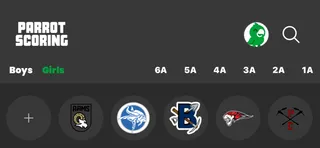
- Open Parrot and search for your school or team.
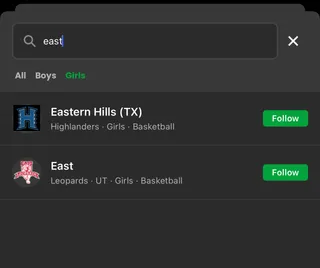
- Tap the team to view its games and details.
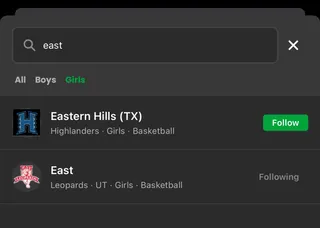
- Tap Follow so the team's games stay front and center for you.
See how
Step-by-step
-
Open Parrot and search for your school or team.
-
Tap the team to view its games and details.
-
Tap Follow so the team's games stay front and center for you.
Update The Score
During the game, use Parrot to keep the score updated so everyone following can stay in sync.
What to do
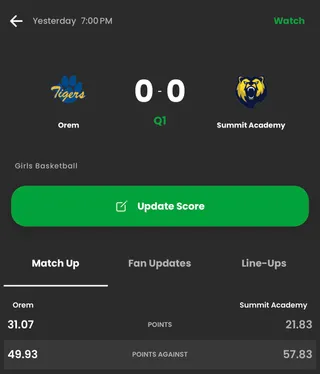
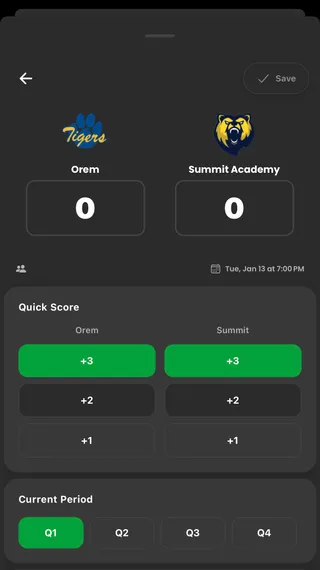
- Open the live game. Click 'Update Score'.
- Adjust the score, quarter, or add a scoring event.
- Tap 'Save' to share the update with everyone.
See how
Step-by-step
-
Open the live game. Click 'Update Score'.
-
Adjust the score, quarter, or add a scoring event.
-
Tap 'Save' to share the update with everyone.
Check the final and look back
After the game, confirm the final score so everyone has the same result and can look back later.
What to do
- At the final buzzer, make sure the score in Parrot matches the true final.
- Re-open the game later to remember key moments and the final result.
- Repeat this flow for every game you want to Parrot.
See how
Step-by-step
-
At the final buzzer, make sure the score in Parrot matches the true final.
-
Re-open the game later to remember key moments and the final result.
-
Repeat this flow for every game you want to Parrot.